Website Feedback Survey Examples & Questions (Copy-Ready)
Written by the tinyDialog team
Last reviewed:
The most useful website feedback surveys ask one specific, neutral question on the exact page where a visitor has the context to answer. Generic “How are we doing?” popups collect vague praise and frustration that rarely point to a concrete fix.
Below are 14 copy-ready website feedback survey examples and website feedback survey questions organized by page type—pricing, signup, help articles, checkout abandonment, cancellation, post-purchase screens, and landing pages. Every example includes the exact wording, response format, when to show it, and the team decision the answers can inform.
If you’re still choosing between a floating widget, an embedded survey, email, or user interviews, start with our guide to collecting website feedback.
Quick reference: match the question to the page
Pricing page
“What, if anything, is stopping you from choosing a plan today?”
Format: Select an Option or Text Input · When: Secondary button or corner prompt after comparing tiers
Signup & onboarding
“What, if anything, was unclear while creating your account?”
Format: Text Input · When: Inline below setup confirmation or next to retry help
Help articles & docs
“Was this page helpful?”
Format: Select an Option (“Yes” / “No” button row) · When: Inline at the bottom of every article
Checkout exit & cancellation
“What’s the main reason you’re not completing your order today?”
Format: Select an Option · When: Non-blocking prompt when pausing in cart or after cancelling
Post-purchase
“What almost stopped you from completing your order today?”
Format: Text Input · When: Inline on the order confirmation screen
Landing & product pages
“Did you find what you were looking for?”
Format: Select an Option (“Yes” / “Partially” / “No”) · When: Inline near the end of the page or via a page-level button
Pricing page feedback survey examples
Visitors on a pricing page are actively weighing tradeoffs—plan limits, billing terms, team seats, or missing integrations. Good pricing page survey questions surface the exact objection holding back a signup without blocking the plan buttons.
1. Plan hesitation check
Question: “What, if anything, is stopping you from choosing a plan today?”
- Response format: Select an Option (single choice) for fast scanning, or Text Input if you want answers in visitors’ own words.
- Suggested choices:
- Not sure which tier fits
- Missing a feature I need
- Price is higher than expected
- Need approval from my team
- Just researching
- When to ask: Place an optional Questions about pricing? button below the tier table or trigger a non-blocking corner widget only after a visitor spends time scrolling through plan details. Keep the primary plan CTAs uncovered.
- Decision it informs: Tells you whether to clarify plan comparison rows, add a missing integration to the FAQ, introduce an annual toggle, or provide a shareable PDF/quote for team approvals.
2. Tier naming and limit clarity
Question: “Which part of our pricing or plan limits is hardest to understand?”
- Response format: Text Input (short free-text box, optional email field if visitors want a reply).
- When to ask: Inline right below the feature comparison table, where visitors finish comparing limits.
- Decision it informs: Helps you rename confusing tiers, rewrite usage-limit footnotes, or surface hidden constraints (like seat minimums or overage rules) higher on the page.
Signup and onboarding survey examples
Signup and onboarding pages show two very different groups: people who finished the step and people who got stuck. Keep the prompt light so it never interrupts form completion.
3. Post-signup clarity check
Question: “What, if anything, was unclear while creating your account?”
- Response format: Text Input (one open text box, optional).
- When to ask: Embedded inline on the welcome or confirmation screen right after signup succeeds, with the main Continue to dashboard button still easy to reach.
- Decision it informs: Surfaces confusing password rules, unclear workspace naming fields, missing SSO options, or unexpected verification delays before they cause drop-off on future signups.
4. First-task goal capture
Question: “What are you hoping to do first with [Product Name]?”
- Response format: Select an Option with 4–5 concrete jobs-to-be-done.
- Suggested choices:
- Add a feedback button
- Rate help docs
- Collect in-app SaaS feedback
- Forward responses to Slack
- Something else
- When to ask: Right after account creation or at the start of an onboarding checklist.
- Decision it informs: Shows which use cases drive the most signups so you can prioritize onboarding templates, quickstart docs, and default empty states.
5. Failed-step or error recovery prompt
Question: “What happened right before this error appeared?”
- Response format: Text Input with an optional email field (and screenshot capture on plans that include it).
- When to ask: As a secondary Report an issue link next to the retry instructions when an import, payment check, or verification step fails—never instead of the retry button.
- Decision it informs: Captures edge cases analytics misses (for example, corporate email filters blocking magic links or file-format quirks) so engineering can fix the real failure mode.
Help article and documentation survey examples
Help centers and technical docs are some of the highest-signal places for website feedback because visitors arrive with a concrete task in mind.
6. Compact page-helpfulness vote
Question: “Was this page helpful?”
- Response format: Select an Option displayed as a button row.
- Suggested choices:
- Yes
- No
- When to ask: Embedded inline directly under every help article and docs guide. Reuse a single survey ID across your site and capture the current page URL automatically so you know which article earned each vote.
- Decision it informs: Highlights high-traffic articles with a high share of “No” votes so your docs team knows which guides to rewrite first. See our documentation feedback widget guide for a live working demo and article-level URL tracking setup.
7. Missing-step follow-up on tutorials
Question: “What, if anything, is still unclear after reading this guide?”
- Response format: Text Input (short comment field, optional email if the reader wants help).
- When to ask: Either as an optional Give feedback on this page button below the steps, or triggered programmatically only after a reader clicks “No” on the helpfulness widget.
- Decision it informs: Pinpoints the exact missing prerequisite, outdated screenshot, broken code snippet, or ambiguous step—rather than only telling you that a page scored poorly.
Checkout abandonment and cancellation survey examples
Post-purchase surveys only reach buyers who completed the transaction. Asking a light question when someone hesitates in checkout or cancels a subscription shows you why revenue leaked.
8. Cart or checkout hesitation check
Question: “What’s the main reason you’re not completing your order today?”
- Response format: Select an Option (single choice).
- Suggested choices:
- Unexpected shipping or tax cost
- Missing my preferred payment method
- Delivery date is too slow
- Need to check with someone first
- Just comparing options
- When to ask: Trigger a dismissible corner widget if a visitor pauses on the cart or checkout page without moving forward, or attach it to a Need help with checkout? button. Never trap the back button or block form fields.
- Decision it informs: Separates fixable checkout blockers (missing Apple Pay, unclear VAT/shipping) from normal comparison shopping so you invest in the changes that actually lift conversion.
9. Subscription cancellation reason
Question: “What’s the main reason you’re cancelling your plan?”
- Response format: Select an Option (single choice), or Text Input for early-stage products with lower volume.
- Suggested choices:
- Too expensive for our usage
- Missing a feature we need
- Switched to another tool
- Project paused or finished
- Too hard to set up
- Other
- When to ask: On the cancellation confirmation screen—immediately after the cancellation succeeds so the user isn’t forced through friction to leave.
- Decision it informs: Distinguishes voluntary pauses from avoidable product gaps, setup friction, or pricing mismatches, helping you prioritize retention work.
Post-purchase and confirmation page survey examples
Right after a purchase or subscription upgrade, buyers still remember every hesitation they worked through during checkout. That makes the confirmation screen one of the best places to ask a single high-leverage question.
10. Checkout friction check
Question: “What almost stopped you from completing your order today?”
- Response format: Text Input (open-ended, optional).
- When to ask: Embedded inline on the order confirmation or “Thank you” page, below the order summary and receipt details.
- Decision it informs: Reveals checkout blockers that existing customers pushed past—such as unclear shipping timelines, missing payment methods, surprise taxes, or promo-code confusion—that may be causing other shoppers to abandon their carts.
11. Checkout experience score (CSAT)
Question: “How easy was it to complete your purchase today?”
- Response format: Numeric Score from 1 to 5 (displayed as numbers or 5 stars, where 1 = Very difficult and 5 = Very easy).
- When to ask: Inline on the confirmation page right after checkout.
- Decision it informs: Gives you a lightweight baseline before and after checkout redesigns or payment-provider changes. Read how CSAT and CES differ in our customer feedback glossary.
12. Attribution and buying-context check
Question: “Where did you first hear about us?”
- Response format: Select an Option (single choice), or Text Input if you want exact sources (like a specific podcast or comparison article).
- Suggested choices:
- Search engine
- Friend or colleague
- Blog or newsletter
- Social media
- Community or forum
- Other
- When to ask: On the post-purchase or post-signup confirmation page while attribution is fresh.
- Decision it informs: Complements referral analytics—especially for word-of-mouth, dark social, and newsletter recommendations that show up as “direct” traffic.
Product, feature, and landing page survey examples
When visitors leave a product or landing page without converting, analytics shows the bounce rate but not the missing piece of information.
13. Information gap check
Question: “What information were you looking for that wasn’t on this page?”
- Response format: Text Input (free-text box).
- When to ask: Via a subtle Give page feedback button in the footer or corner widget on key product, integration, or landing pages.
- Decision it informs: Uncovers recurring pre-sales questions—like compliance details, self-hosting options, or browser support—that belong directly in your page copy.
14. Task completion check for navigation or search
Question: “Did you find what you were looking for?”
- Response format: Select an Option (single choice).
- Suggested choices:
- Yes
- Partially
- No
- When to ask: Inline below search results, template directories, or category pages.
- Decision it informs: Shows whether visitors struggle with your site navigation, search ranking, or category naming—and whether a taxonomy change actually improved findability.
How to write better website feedback survey questions
If you adapt these templates for your own pages, five habits separate useful answers from noisy ones:
- Ask about one experience at a time. Combine pricing and documentation into a single question and you won’t know which one caused a low score.
- Use neutral wording. Phrases like “What, if anything, was unclear…” give respondents permission to say “nothing” without nudging them to complain or flatter you.
- Avoid double negatives and jargon. Write “shipping options” instead of “fulfillment modality,” and “choose a plan” instead of “complete tier selection.”
- Match format to what you know. Use Text Input while discovering unknown issues; switch to Select an Option or Numeric Score once you know the top reasons and want to measure how often each occurs.
- Account for who answers. Voluntary website surveys skew toward visitors who hit a snag or feel strongly. Use responses to identify problems worth investigating, then validate with analytics or user sessions. Learn more about selection bias in our customer feedback glossary.
Instead of
“How much did you love our new checkout?”
Ask this
“How easy was it to complete your purchase today?”
Doesn’t assume a positive experience.
Instead of
“Any feedback for us?”
Ask this
“What, if anything, was unclear on this pricing page?”
Anchors the visitor to one page and decision.
Instead of
“Why didn’t you sign up for Pro?”
Ask this
“What, if anything, is stopping you from choosing a plan today?”
Feels less accusatory and allows non-blockers like “Just researching.”
Instead of
“Rate our website from 1 to 10.”
Ask this
“Did you find what you were looking for?”
Ties the answer directly to the visitor’s goal.
Turn any example into a live widget with tinyDialog
Every example above maps directly to tinyDialog’s three survey types, so you can test a question on one page in a few minutes without building custom forms:
- Text Input: Use for open-ended friction questions on pricing, signup, error states, and post-purchase screens. You can also allow an optional reply email, plus screenshot attachments on Pro.
- Select an Option: Use for “Yes” / “No” helpfulness button rows, plan-hesitation checklists, cancellation reasons, and onboarding goal pickers.
- Numeric Score: Use for 1–5 star ratings, CSAT, or 0–10 scales when tracking a metric over time.
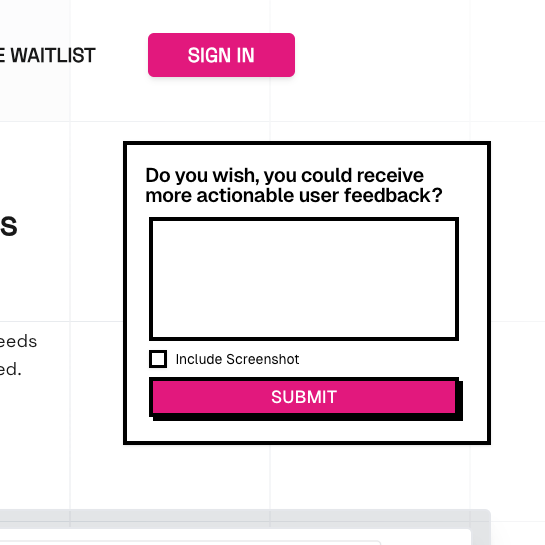
An inline tinyDialog survey embedded on a webpage so visitors can answer without leaving the page.
Every embedded or popup widget automatically records the page URL (window.location.href), browser, and viewport size with each submission—so you can reuse one survey across multiple pages and still see where every comment came from.
- Pick one page and one question from the examples above.
- Create the survey in the tinyDialog dashboard (free for up to 25 responses per month).
- Embed it inline or wire it to a button using our website feedback widget setup guide.
Frequently asked questions
How many questions should a website feedback survey have?
Start with one question. Single-question widgets fit inline on a page or in a small corner popup, respect mobile viewports, and get answered far more often than multi-step forms. Add a second follow-up only when the first answer needs explanation (for example, opening a text box only after a visitor clicks “No”).
Should I use multiple-choice or open-ended website feedback questions?
Use open-ended text questions first when you don’t yet know why visitors hesitate or leave—you’ll learn their exact language. Once the same 4–5 themes repeat, switch to multiple-choice options to measure which issue affects the most visitors, and keep an “Other” option or periodic text prompt so new problems don’t go unseen.
When is the best time to show a website feedback survey?
Ask right after a natural stopping point: at the bottom of a help article, on a signup or order confirmation screen, or when a visitor clicks a clearly labeled feedback button. Avoid showing a blocking modal the moment someone lands on a page—they haven’t had enough experience to give a useful answer yet.
How many responses do I need before changing a page?
You don’t need hundreds of responses to fix an obvious bug or missing fact. If three visitors on your pricing page ask whether annual billing includes VAT, add that note right away. For larger layout or pricing changes, treat survey comments as leads and cross-check them against page analytics, support tickets, or a few short user tests before committing.
Ready to test one of these questions on your site?
- Create a free tinyDialog survey (25 responses/month free)
- Follow the JavaScript website widget setup guide