Add an in-app feedback widget to your SaaS
Trigger a feedback survey after a user action—like exporting a report, completing onboarding, or cancelling a plan. Call showWidget() from @tinydialog/sdk-js and attach user and event context to every response.
Try triggering an in-app feedback widget after a user action
Pick a SaaS workflow below and click the action button. Completing the action calls showWidget(), opens the widget in the corner, and attaches the user and event metadata to the recorded response.
app.acme-analytics.io/reports/monthly-usageMonthly usage · CSV
Export monthly usage report
4,820 rows · Nov 2026 · Ready to download
Click to simulate the action and open showWidget() in the corner.
Trigger a feedback survey after a user action in 3 steps
- Install
@tinydialog/sdk-jsin your React, Next.js, Vue, Svelte, or plain TypeScript app. It ships with TypeScript types and zero framework dependencies.npm install @tinydialog/sdk-js # or pnpm add @tinydialog/sdk-js - Create a survey in the tinyDialog dashboard (Text Input, Select an Option, or Numeric Score). Open Setup & Connections and copy your survey ID.
- Call
showWidget()after the user’s action resolves. Choose a corner withside(BOTTOM_RIGHT,BOTTOM_LEFT,TOP_RIGHT, orTOP_LEFT), identify the user if needed, and pass event context inextraData.
import {showWidget} from '@tinydialog/sdk-js';

async function handleExportReport(format: 'csv' | 'pdf') {
  await exportReport({format});

  showWidget('YOUR_SURVEY_ID', {
    side: 'BOTTOM_RIGHT',
    user: currentUser.email, // or an internal userId
    extraData: {
      event: 'report_exported',
      format,
      plan: currentUser.plan,
    },
  });
}
If another tinyDialog widget is already visible, showWidget() closes it automatically before opening the new one. You can also call closeWidget('YOUR_SURVEY_ID') if the user navigates away.
Optional: render your own in-app UI with submitFeedback()
Already have a custom modal, toast, or star bar built in your design system? Send responses directly to tinyDialog with submitFeedback() (requires Cloudflare Turnstile captcha to be disabled on that survey).
import {submitFeedback} from '@tinydialog/sdk-js';

await submitFeedback('YOUR_SURVEY_ID', 'Smooth', {
  user: currentUser.id,
  extraData: {
    event: 'report_exported',
    plan: currentUser.plan,
  },
});
Attach user and event context—without nagging users
A comment like “export broke” is hard to debug on its own. Every showWidget() call lets you combine automatic browser metadata with the exact product state from your app:
- 1. Automatic page and device context
- tinyDialog automatically records the current route (
window.location.href), browser, operating system, and viewport size on every response. - 2. User identifier and custom extraData tags
- Pass
user(email or internal ID) and a flatextraDatastring map—such as plan tier, feature flag, or triggered event name. See the extraData SDK docs for dashboard formatting. - 3. Lightweight client-side cooldown
- Wrap
showWidget()in a small guard so a power user who exports ten reports in one afternoon only sees the prompt once.
import {showWidget} from '@tinydialog/sdk-js';

const COOLDOWN_MS = 14 * 24 * 60 * 60 * 1000;

export function maybeAskAfterAction(
  surveyId: string,
  storageKey: string,
  context: {user: string; extraData: Record<string, string>},
) {
  const lastShown = Number(localStorage.getItem(storageKey) ?? 0);
  if (Date.now() - lastShown < COOLDOWN_MS) return;

  localStorage.setItem(storageKey, String(Date.now()));
  showWidget(surveyId, {
    side: 'BOTTOM_RIGHT',
    user: context.user,
    extraData: context.extraData,
  });
}
High-signal SaaS moments to trigger a survey
Timing matters as much as wording. Wait until a user finishes a meaningful step so the prompt feels helpful rather than disruptive. For deeper strategy on timing, response rates, and churn prevention, read our guide to programmatic feedback in SaaS.
After completing onboarding
- When to call showWidget()
- Final setup step resolves
- Example question
- “What, if anything, was unclear while setting up your workspace?”
- Suggested extraData
event: onboarding_completed, step, plan
After a core feature action
- When to call showWidget()
- Export, publish, import, or team invite succeeds
- Example question
- “How smooth was exporting this report?”
- Suggested extraData
event: report_exported, format, plan
After an upgrade or usage milestone
- When to call showWidget()
- First paid checkout or Nth completed project
- Example question
- “What made you decide to upgrade today?”
- Suggested extraData
event: plan_upgraded, tier, billingCycle
After subscription cancellation
- When to call showWidget()
- Cancel API call completes (never before)
- Example question
- “What’s the main reason you’re cancelling today?”
- Suggested extraData
event: subscription_cancelled, plan, tenureDays
Turn in-app responses into product decisions
Keep every triggered response connected to the tools your product, engineering, and customer success teams already check every day:
Inspect user & event badges in the dashboard
Every submission displays its answer alongside its Contact badge, page URL, custom extraData badges, browser, OS, and viewport size. On Pro, enable AI topic detection to cluster recurring feature requests and bugs.
Forward alerts to Slack, Discord, or webhooks
Route cancellation reasons or onboarding snags straight to Slack, Discord, Airtable, n8n, or any webhook endpoint in real time.
Export responses to CSV
Download responses as CSV with timestamp, answer, respondentContact, respondentUrl, OS, and browser for quick spreadsheet review or sharing with stakeholders.
Slice extraData cohorts via the Responses API
Pull full responses—including respondent.contact and every extraData key like plan or event—into your data warehouse or CRM using the authenticated Responses API (GET /api/v1/responses?surveyId=YOUR_SURVEY_ID) in JSON or RSS.
Need a passive button for marketing pages or an inline “Was this page helpful?” prompt for docs? Compare the website feedback widget setup and documentation feedback widget guide.
What you can do with tinyDialog

Data connectors
Forward new responses to Slack or Discord. Use a webhook to send feedback to an Airtable, Zapier, or n8n workflow.
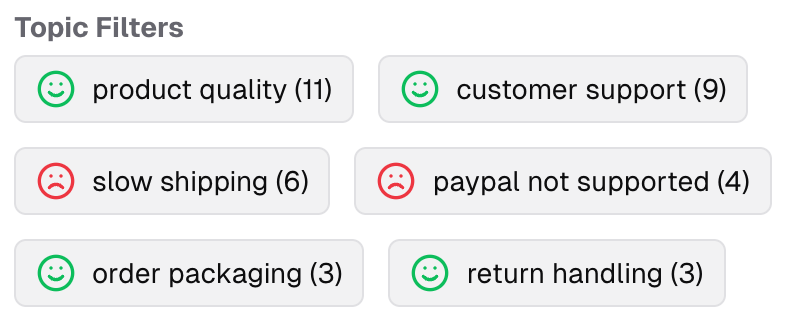
AI topic detection
On Pro, group feedback by topic and filter responses in the dashboard to see what visitors bring up repeatedly.



Spam protection
Enable Cloudflare Turnstile on your widget to help filter automated submissions.
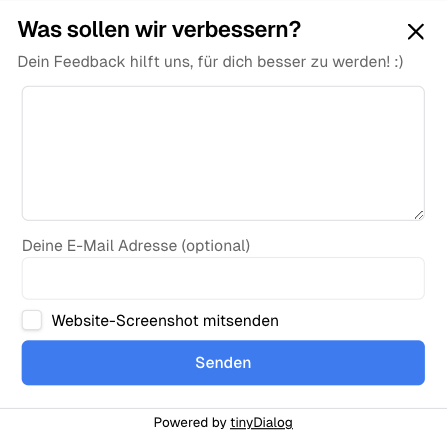
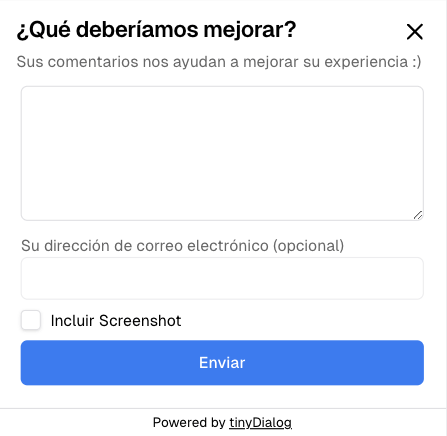
Widget localisation
Write the question, button label, and other widget text in your audience’s language.
Frequently asked questions
- Does the in-app feedback widget work with React, Next.js, Vue, and Svelte SPAs?
- Yes. Install @tinydialog/sdk-js and call showWidget() inside any client-side event handler, mutation callback, or route effect. The widget renders inside an isolated fixed iframe, so it does not inherit or collide with your app CSS.
- How do I avoid nagging the same user on every action?
- Guard showWidget() with a simple cooldown in localStorage or a user flag from your backend (for example, once every 14–30 days per workflow). Only trigger the survey after the user finishes the action so you never interrupt work in progress.
- Can I pass an internal user ID instead of an email address?
- Yes. The user option accepts any string—such as a UUID, workspace ID, or email—and is stored as the respondent’s contact (shown as a Contact badge in the dashboard, respondentContact in CSV exports and full webhooks, and respondent.contact in the Responses API). You can also omit user completely to keep responses anonymous.
- What types of values can I send in extraData?
- extraData accepts a flat Record<string, string> object. Convert numbers or booleans to strings (for example, String(rowCount)), and avoid empty values because blank keys or values are skipped by the SDK.
- What if my SaaS app uses Cross-Origin-Embedder-Policy (COEP) headers?
- By default, tinyDialog loads the widget iframe with cross-origin isolation enabled. If your app or embedded assets need it disabled, pass crossOriginIsolation: false in showWidget() options to append coi=0 to the iframe URL.
- Can I close the widget programmatically or forward responses to Slack and webhooks?
- Yes. Call closeWidget(surveyId) if a user navigates away or dismisses a flow, and connect Slack, Discord, Airtable, n8n, or a generic webhook under Setup & Connections so product teams see contextual feedback as soon as it arrives.
Create your first survey
Start free with 25 responses per month.
Start free